

Proactive chat software that knows when to say hello
Most visitors will not start a chat by themselves. A well-timed message on the right page gives them an easy way in.
Why waiting for visitors to ask is not enough
Think of a good shopkeeper: they notice when someone looks unsure, and they leave everyone else alone.
- A visitor stuck on your pricing or delivery page leaves without saying anything.
- Returning visitors get the same treatment as somebody who has just arrived.
- A pop-up on every page at the same moment quickly becomes annoying.
- Someone arriving from a campaign sees nothing that relates to why they came.

How triggers give you the shopkeeper's instinct
You choose the conditions and write the message. Each trigger greets a visitor once.
Time on page
Wait until someone has had a proper look before offering help. Read our guide to setting triggers.
URL
Show a message only on the pages where it makes sense, such as delivery or wholesale.
Referrer
Greet people from a newsletter or a particular website in a way that fits.
Returning visitors
Welcome back people who have been before, with a different message.
Live visitor list
See current page, referrer, country, device and visit count, so you can judge what is working.
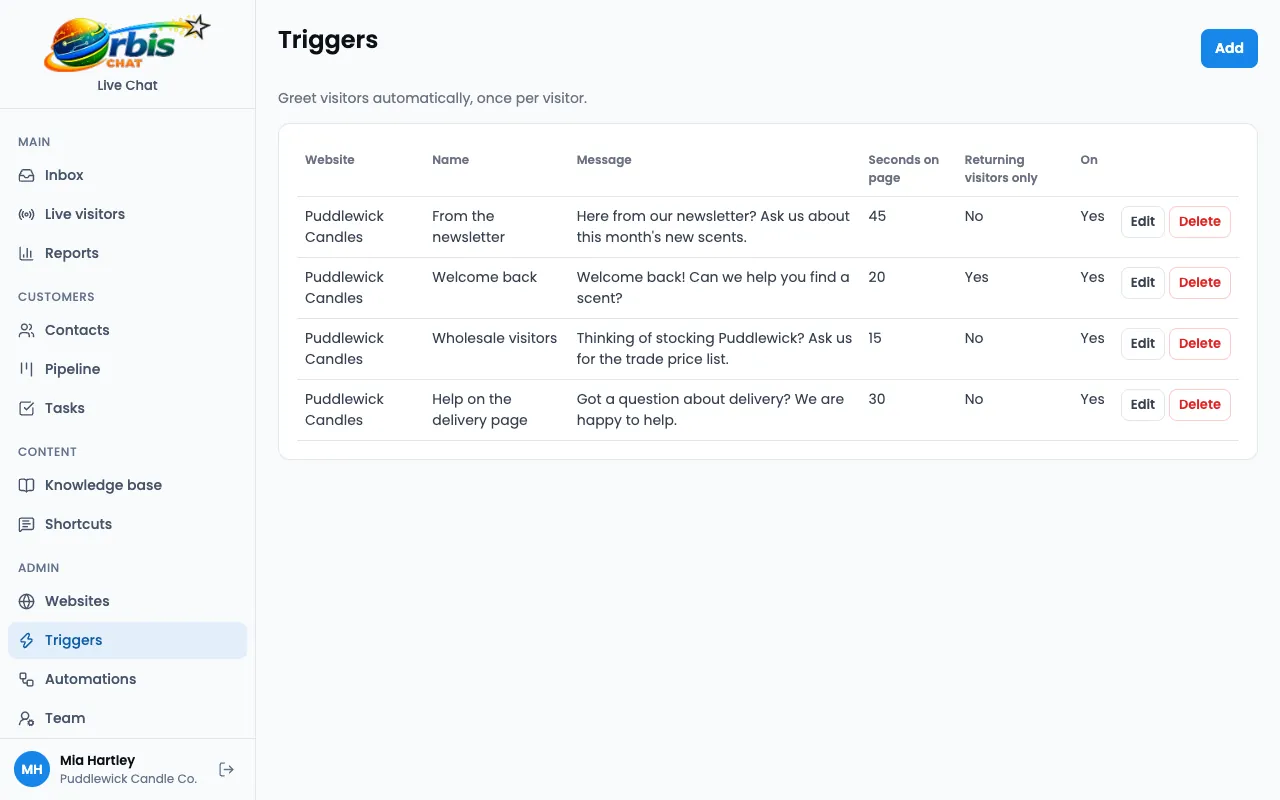
Worked example: helping on the delivery page
A fictional shop notices that delivery is the question that comes up most often.
Choose the page
They create a trigger for URLs containing /delivery.
Set the timing
They wait 30 seconds, so people who find the answer straight away are left alone.
Write a useful message
"Got a question about delivery? We are happy to help." It is short and specific to the page.
Review and adjust
They look at their reports and the chats that follow, then change the wording or timing if needed.
This is an illustration of how the features fit together, not a real customer story.
Frequently asked questions
Will triggers annoy my visitors?
They can if overused. Start with one or two pages where people often have questions, and give visitors time to read first.
Can I turn a trigger off?
Yes. Each trigger can be switched on or off at any time.
What if nobody is online when a trigger fires?
If a visitor replies when nobody is available, the offline form takes their message and creates a ticket.